Does Vodafone Egypt Support eSIM? Step-by-Step Activation
Many travelers visiting Egypt wonder the same thing before they arrive: Does Vodafone Egypt support eSIM and how difficult is the activation process As mobile data becomes essential for WhatsApp Instagram and Google Maps, having the right eSIM setup can make your entire trip smoother. The good news is that Vodafone Egypt does support eSIM, but the activation steps and requirements can differ depending on whether you are a tourist or a long term visitor.
In this guide, you will learn exactly how Vodafone Egypt eSIM works, where to get it, what documents you may need, and how to activate it step by step on your iPhone or Android device. You will also see when Vodafone’s eSIM makes sense, and when a travel eSIM such as Gohub may be the easier choice for short stays. This helps you decide confidently before you land in Cairo, Giza or Luxor.
I. Does Vodafone Egypt Support eSIM
Vodafone Egypt does support eSIM, and the service is available for both residents and certain categories of travelers. This means you can use a digital SIM instead of inserting a physical SIM card, which is helpful if you need mobile data as soon as you arrive in Egypt. Vodafone describes eSIM as a digital profile that activates directly on your device without any hardware changes, and most modern smartphones are already compatible.
Short answer
Yes. Vodafone Egypt supports eSIM on eligible devices, and travelers can activate it through a Vodafone store, an online QR code, or certain approved reseller partners. However, tourists must follow specific steps and may be asked for identification depending on where they activate the line.
I. What Vodafone Egypt says about eSIM
Vodafone’s official information states that eSIM works the same way as a physical SIM but is stored digitally on your phone. The service is available for prepaid and postpaid users in Egypt, and activation typically requires scanning a QR code provided by Vodafone. In some cases, especially for tourists, activation may require visiting a Vodafone store to verify identity.
Device requirements and eligibility
To use a Vodafone Egypt eSIM, you must meet three conditions:
- Your phone must support eSIM technology
- Your device must be unlocked
- You must provide basic ID if you activate the eSIM at a physical store
Most recent iPhones, Google Pixels, and many Samsung Galaxy devices will work without issue. Travelers who are unsure can check compatibility in their device settings or verify with Vodafone upon arrival.
II. Where You Can Get a Vodafone Egypt eSIM
Vodafone Egypt offers several ways to obtain an eSIM, but the exact experience depends on whether you are a resident or a short-term visitor. Travelers should know what to expect before arrival because some activation methods require identity verification or an in-person visit.
Vodafone store activation
The most reliable way for tourists to get a Vodafone Egypt eSIM is to visit an official Vodafone store. These stores are located in Cairo Airport, Giza, downtown Cairo, major malls, and tourist districts. Staff can check your device compatibility, verify your passport for prepaid registration, and generate a QR code for your eSIM on the spot. Activation usually takes only a few minutes.
Vodafone online purchase or QR delivery
Some Vodafone Egypt plans allow users to receive an eSIM QR code through online channels or the Vodafone app. This option is more convenient for residents than tourists because account verification is often required. Travelers may still receive a QR code online, but successful activation may depend on matching ID details or having a local Vodafone account.
ID requirements for tourists
Egypt’s telecom regulations require SIM registration, and tourists may need to show a passport when activating a Vodafone eSIM in person. If you plan to buy your eSIM at the airport, be prepared for a quick ID check. For online activation, passport verification might not always be supported, which is why many visitors prefer purchasing directly at a Vodafone store.
III. Step by Step Guide to Activate Vodafone Egypt eSIM
Activating a Vodafone Egypt eSIM is straightforward once you know the exact steps. Whether you purchase it at a Vodafone store or receive a QR code online, the setup process is similar for both iPhone and Android devices.
Step 1: Check device compatibility
Before activating, confirm that your device supports eSIM and is fully unlocked. Most recent iPhones, Google Pixel phones, and Samsung Galaxy models already support digital SIM profiles. If your phone is carrier-locked, the eSIM will not activate on Vodafone Egypt’s network.
Step 2: Buy your Vodafone Egypt eSIM plan
Choose your preferred Vodafone plan, then purchase it at a Vodafone store or through the official Vodafone website or app. After completing the purchase, you will receive a QR code that contains your eSIM details. Keep the QR code open on another device or printed out so you can scan it easily.
Step 3: Install your eSIM using the QR code
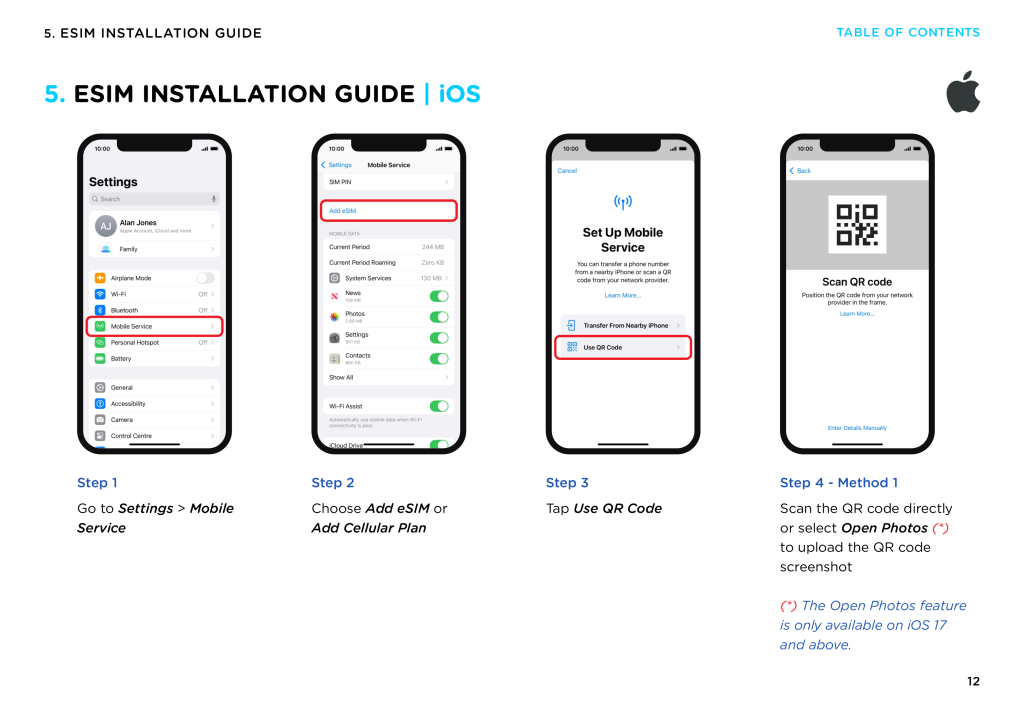
On iPhone:
Open Settings → Mobile Data → Add eSIM.
Select Use QR code, then scan the code provided by Vodafone.
Your phone will download the eSIM profile and create a new mobile line.
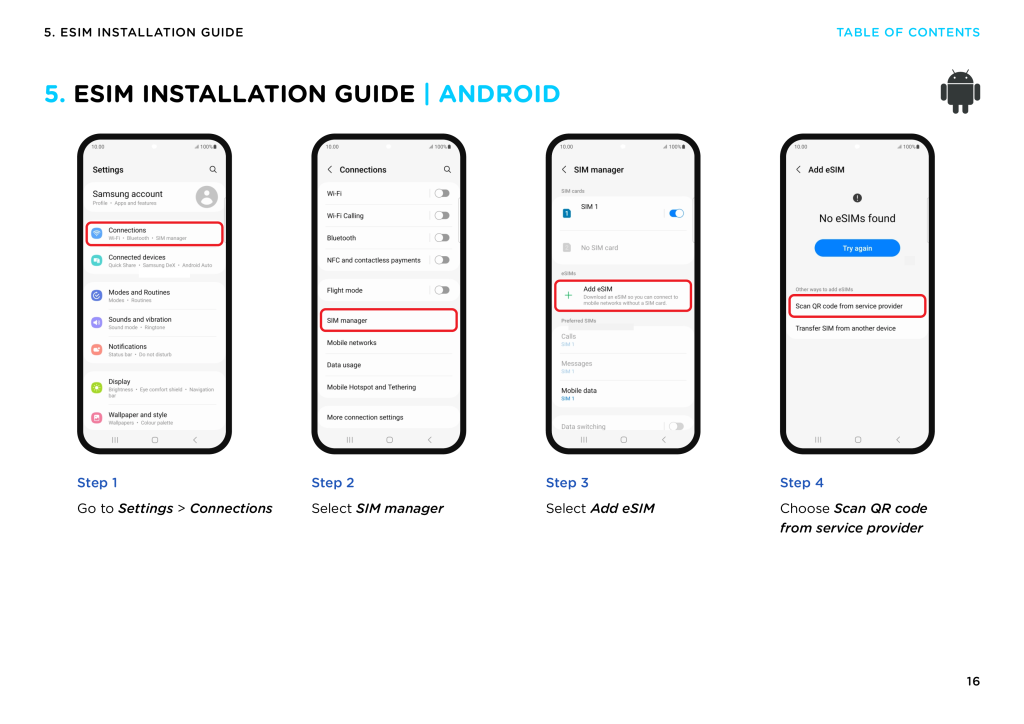
On Android:
Go to Settings → Network and Internet → SIMs → Add eSIM.
Choose Scan QR code, then follow on-screen instructions until your new line appears.
Once installed, label the line as Vodafone Egypt so you can recognize it easily.
Step 4: Enable data roaming for the eSIM line
Vodafone requires data roaming to be enabled for travelers using an Egypt eSIM.
Turn on Data Roaming for the Vodafone line and turn it off for your home SIM to avoid unexpected roaming charges.
Step 5: Test connectivity for WhatsApp Instagram Maps
When the eSIM is active, your phone should connect to the Vodafone Egypt network automatically. Test your data by opening:
- WhatsApp messages
- Instagram feed or stories
- Google Maps live navigation
If all three apps load normally, your eSIM is fully activated.
Step 6: APN settings if data does not load
If your device shows signal bars but no internet connection:
- Go to Mobile Data → Access Point Names
- Make sure the APN is set to: internet
- Leave username and password blank
- Restart your device
This fixes most activation or data loading issues for Vodafone Egypt eSIMs.
IV. Vodafone Egypt eSIM Limitations
While Vodafone Egypt does support eSIM, there are several limitations that travelers should understand before choosing this option. These limitations do not make Vodafone a bad choice, but they help set realistic expectations, especially for short-term visitors who rely heavily on mobile data.
Data only plans with no local number
Most Vodafone Egypt eSIM options available to tourists are data only. This means you do not receive a local Egyptian phone number for calls or SMS. If you need a local number for hotel check-ins, domestic calls or certain booking services, you may need to purchase a physical SIM instead.
Plans cannot always be topped up
Some Vodafone Egypt prepaid eSIM plans are not rechargeable once activated. If you run out of data during your trip, you may need to buy a new eSIM or switch to a travel eSIM. This can be inconvenient for travelers staying longer than expected or for those who consume more data through Instagram and Maps.
Coverage differences in rural and desert areas
Vodafone offers strong coverage in major cities such as Cairo, Giza, Alexandria and Luxor. However, like all local carriers in Egypt, signal quality drops in remote regions, desert routes and archaeological sites far from urban centers. Travelers heading to the Sahara, Siwa Oasis or the White Desert should download offline maps in advance.
Speed drops during peak hours
In crowded areas such as Cairo Downtown, Khan el Khalili Bazaar or tourist hotspots during peak visiting hours, upload speeds may slow down. This mainly affects apps that require strong upload performance such as Instagram Stories, WhatsApp video calls and cloud backups.
V. Vodafone Egypt eSIM vs Travel eSIM Options
For many travelers, the biggest question is whether they should activate a Vodafone Egypt eSIM upon arrival or use a travel eSIM purchased before flying. Both solutions work well in Egypt, but they serve different types of travelers and different needs. Understanding the differences helps you avoid long queues, complicated registration, or unexpected data limits during your trip.
When Vodafone Egypt eSIM is the right choice
Vodafone Egypt is a solid option if:
- You plan to stay in Egypt for an extended period
- You need a local Egyptian number for calls or SMS
- You want to register a prepaid plan under your passport
- You prefer activating in person at an official store
- You are comfortable completing ID verification in Egypt
Vodafone is also suitable if you frequently make local voice calls or need access to services that require a local mobile number. Long-term visitors such as students or business travelers often choose this route.
When a travel eSIM like Gohub is easier
For short-term travelers, a travel eSIM is often the simpler choice. Travel eSIMs such as Gohub allow you to:
- Install the eSIM before departure, so you have data the moment you land
- Skip airport queues and avoid passport registration at Vodafone stores
- Use WhatsApp Instagram and Google Maps immediately after turning on your phone
- Enjoy clear, upfront price per GB with no confusing Fair Usage limits
- Receive support in English or Vietnamese around the clock
- Replace your eSIM quickly if you face installation issues
Travel eSIMs are ideal for tourists spending 5 to 14 days in Egypt, backpackers, solo travelers, or content creators who prefer convenience and fast activation.
Quick comparison table Vodafone Egypt vs Travel eSIM
| Feature | Vodafone Egypt eSIM | Travel eSIM (Example: Gohub) |
|---|---|---|
| Activation method | Usually in-store | Install before flight |
| ID requirement | Passport required | No ID needed |
| Local phone number | Yes (with certain plans) | No, data only |
| Data price transparency | Varies by store and plan | Clear per GB pricing |
| Typical use case | Long-term visitors | Short trips and tourists |
| Setup time | 10–20 minutes in store | 2 minutes with QR code |
VI. Advantages of Using a Travel eSIM (Gohub Example)
Travel eSIMs have become extremely popular among tourists visiting Egypt, especially those who want a fast setup and reliable data without dealing with in-country registration. While Vodafone Egypt works well for many situations, a travel eSIM offers a different type of convenience that fits short trips and flexible travel plans.
Instant activation before arrival
A travel eSIM allows you to install and activate your data plan while you are still at home. This means the moment your plane lands in Cairo or Giza, your phone connects instantly without waiting in line at a Vodafone store or looking for WiFi to complete the setup. For travelers arriving late at night or rushing between airport terminals, this is a major advantage.
Clear and predictable price per GB
Many local carriers offer variable pricing or store-specific promotions. In contrast, travel eSIMs such as Gohub use transparent pricing with a clear cost per GB. This helps travelers budget their data usage, especially when using Instagram, WhatsApp, and Google Maps throughout the day. It also removes the risk of unexpected speed reductions due to unclear Fair Usage limits.
24 hour support and fast replacement
If a tourist encounters issues with a prepaid local eSIM, support often requires returning to a physical store. Travel eSIMs solve this by offering remote support at any time of day. Gohub, for example, provides quick eSIM replacement if something goes wrong during installation, which is especially valuable for travelers who may not have access to a Vodafone branch nearby.
Works immediately with WhatsApp Instagram and Maps
A travel eSIM focuses entirely on mobile data, which is what most short-term travelers need. Whether you are chatting with drivers on WhatsApp, uploading photos from the Pyramids, or navigating Cairo’s busy streets with Google Maps, a pre-installed travel eSIM ensures everything works from the first minute you arrive.
VII. Troubleshooting for Vodafone Egypt eSIM
Even with a successful installation, some travelers may experience minor issues when using a Vodafone Egypt eSIM. Most problems are easy to fix once you understand how the eSIM behaves on local networks. Use the steps below to restore your connection quickly.
No signal after installation
If your eSIM installs correctly but shows no signal bars:
- Restart your phone to re-register on the Vodafone network
- Make sure the Vodafone eSIM line is set to On
- Disable the physical SIM temporarily to force reconnection
- Check that your device is not locked to a foreign carrier
Many no-signal issues resolve once the device reconnects to a local tower.
eSIM shows signal but no internet
This usually points to a data configuration issue. Try the following:
- Open Mobile Data → Access Point Names (APN)
- Set the APN to internet
- Leave username and password blank
- Turn airplane mode on and off
- Confirm Data Roaming is enabled for the Vodafone line
If the signal is strong but data is not loading, APN is the most common cause.
WhatsApp call issues
Vodafone generally handles WhatsApp calling well, but network congestion can reduce call quality. To fix this:
- Move to an open outdoor area
- Switch from video to voice call to reduce upload load
- Restart mobile data on the Vodafone line
- Temporarily disable your other SIM if using dual SIM
Call quality usually improves instantly once the network stabilizes.
Slow speeds in crowded areas
Egypt’s busiest tourist zones and markets can experience peak-time slowdowns. This affects apps that require strong upload speeds such as Instagram Reels, Stories and cloud backups.
To improve speed:
- Step away from very crowded spots
- Pause uploads and resend them when the network is less busy
- Temporarily switch to airplane mode and back
- Download offline content (maps, drafts) when on WiFi
You should see performance improvements, especially during off-peak hours.
VIII. Frequently Asked Questions
Does Vodafone Egypt support prepaid eSIM for tourists
Yes. Vodafone Egypt supports prepaid eSIM for eligible tourists, but activation often requires visiting a Vodafone store and presenting your passport. Some online activation methods work, but they do not always support tourist registration.
Can I activate a Vodafone Egypt eSIM at the airport
Yes. Vodafone has official stores in Cairo International Airport where travelers can request an eSIM. Availability depends on the branch, and queues can be long during peak arrival times. Some travelers prefer installing a travel eSIM beforehand to avoid waiting.
Do I need ID to buy a Vodafone Egypt eSIM
In most cases, yes. Egypt requires SIM registration. Tourists must show a passport when activating a Vodafone prepaid eSIM at a physical store. This applies even if you already received a QR code online.
Is a travel eSIM easier than Vodafone Egypt eSIM
For short stays, many travelers find a travel eSIM easier because it requires no passport verification and can be installed before the flight. A travel eSIM such as Gohub activates instantly on landing, making it convenient for using WhatsApp Instagram and Google Maps without visiting a store.
Does Vodafone Egypt eSIM include a local phone number
Only certain plans include a local number. Many prepaid tourist eSIM options are data only. If you need calls and SMS, ask the Vodafone staff before activating the plan.
Does Vodafone Egypt eSIM work with WhatsApp
Yes. You can continue using your home WhatsApp number while the Vodafone eSIM provides data. Only your mobile data line changes; your WhatsApp identity stays the same.
IX. Conclusion
Vodafone Egypt does support eSIM, and for many travelers it is a reliable option for staying connected while exploring Cairo, Giza, Luxor or Alexandria. However, activation can require a store visit, passport verification and a manual setup process that may not always be convenient for short trips. Understanding the steps, requirements and limitations helps you prepare before you arrive, especially if you rely on WhatsApp, Instagram and Google Maps during your travels.
For visitors who prefer fast setup with no paperwork, a travel eSIM can be an easier alternative. You can install it before your flight, activate it instantly on landing and avoid queues at airport counters. Whether you choose Vodafone or a travel eSIM like Gohub, this guide gives you everything you need to decide confidently about does Vodafone Egypt support eSIM, how to activate it and which option fits your itinerary.