How to Use WhatsApp, Instagram, and Maps in Egypt With an eSIM
Staying connected in Egypt can be confusing for many travelers. You land in Cairo or Giza, open your phone, and the first thing you want to check is WhatsApp, Instagram, or Google Maps. These three apps guide almost every part of your trip. You use WhatsApp to talk to drivers and tour guides, Instagram to share your moments at the pyramids, and Maps to navigate busy streets and historical sites.
The good news is that you can use all of them smoothly with an eSIM. Installing an eSIM before your flight gives you instant data when you arrive, no airport queues, no roaming costs, and no paperwork. In this guide, you will learn how to use WhatsApp Instagram and Maps in Egypt with an eSIM, how to set it up correctly, how much data you need, and the best practices to keep your trip running without interruptions.
I. Does an eSIM Work Well in Egypt for WhatsApp Instagram and Maps
Using an eSIM in Egypt works very well for most travelers. As long as your phone supports eSIM and your plan connects to a strong local network, you can use WhatsApp Instagram and Google Maps just like at home. Egypt has widespread mobile coverage in major tourist areas including Cairo Giza Luxor Alexandria and the Red Sea region, which makes travel data highly reliable.
Short answer
Yes. WhatsApp Instagram and Maps work smoothly in Egypt with an eSIM. These apps use internet data, not local phone numbers, so you can chat, upload content, and navigate as long as your eSIM has an active data connection.
Why an eSIM is more reliable than airport SIM cards
Many travelers arrive expecting to buy a SIM at Cairo Airport, but airport counters often have long lines or sell physical SIMs that require ID registration. Some counters do not activate eSIM for tourists. With a travel eSIM, you install everything before departure. The moment you land, you have internet for ride hailing, navigation, and messaging without waiting or filling any documents.
Supported networks in Egypt for eSIM users
Most travel eSIM plans connect to one of the major Egyptian carriers. The strongest networks include:
- Vodafone Egypt
- Orange Egypt
- Etisalat Misr
These networks offer good coverage in the main cities and tourist sites. Speeds in rural or desert areas may vary, but for city travel and landmarks like the Pyramids of Giza, Karnak Temple, and the Nile riverfront, the connection is stable enough for messaging, stories, and live navigation.
II. How to Install and Activate an Egypt eSIM Before You Fly
Installing your eSIM before the flight is the best way to make sure WhatsApp Instagram and Maps work the moment you arrive in Egypt. The full process takes only a few minutes if you prepare in advance. You only need a stable WiFi connection and an unlocked phone that supports eSIM.
Check device compatibility
Before buying an Egypt eSIM, confirm that your phone supports eSIM technology. Most recent iPhone models and many Android devices such as Google Pixel and Samsung Galaxy work well. Also make sure your device is unlocked. If your phone is still locked to a home carrier, your eSIM will not activate in Egypt.
Purchase and receive your eSIM QR code
Once you choose a travel eSIM provider, you will receive a QR code by email. This code contains your eSIM profile. You can install it immediately or save it for later. For a smooth trip, install it before departure while you have strong WiFi at home.
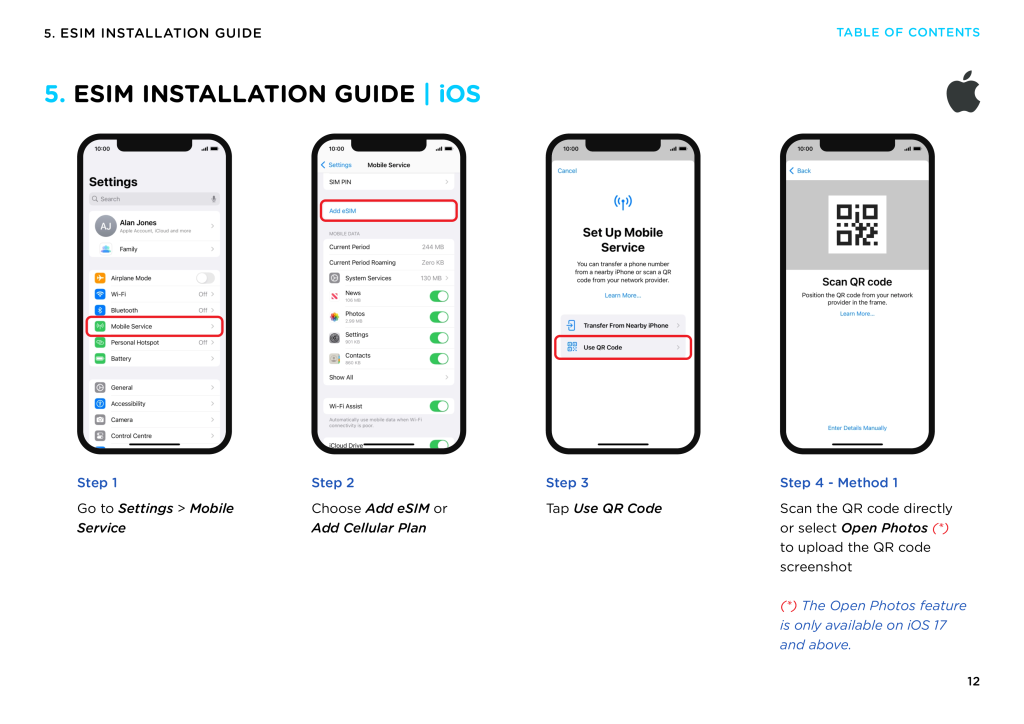
Install eSIM on iPhone
Open Settings, tap Cellular, then Add eSIM. Scan the QR code provided by your eSIM provider. The phone will download your profile and show a new line on your device. Label the line for clarity, for example Egypt Travel Data.
Install eSIM on Android
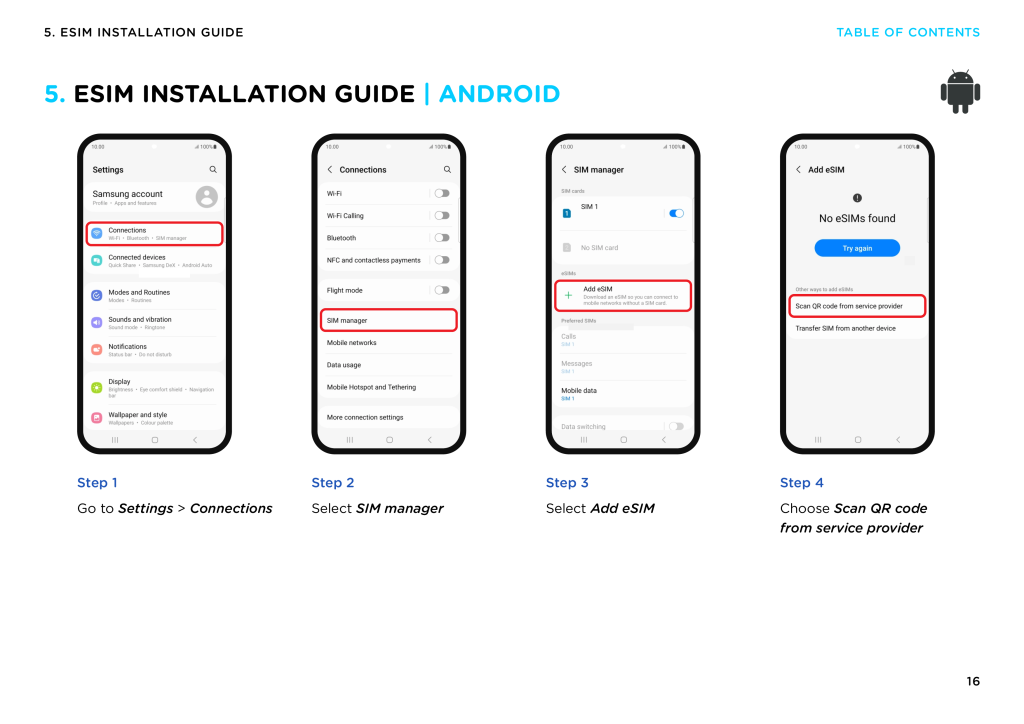
The steps vary slightly by model. On most devices, go to Settings, then Network and Internet, and look for Add eSIM. Scan the QR code and wait for the installation to complete. Once added, name the profile so you know which line to use in Egypt.
Turn on data roaming the right way
After installation, you must enable data roaming for the eSIM line. This allows your phone to connect to Egyptian networks. At the same time, turn off data roaming for your home SIM to avoid accidental roaming charges. Keep your home SIM active only for calls or OTP messages if needed.
APN settings for smooth connectivity
Most travel eSIMs configure the APN automatically. If your data does not connect, open the APN menu inside your mobile data settings and follow the APN value provided by your eSIM provider. Once the APN is correct, WhatsApp Instagram and Maps will load normally.
III. Using WhatsApp in Egypt With an eSIM
WhatsApp is the main communication tool for travelers in Egypt. Drivers, guides, hotels, and tour operators all rely on it, so having stable mobile data is essential. With an eSIM installed before your flight, WhatsApp works instantly when your plane lands, even before you reach passport control.
Texting and group messaging
WhatsApp messages load normally in Egypt as long as your eSIM has active data. You can send text updates to family, share photos with friends, or coordinate with your tour group. Messages consume very little data, so they work well even in areas with weaker signal.
WhatsApp voice and video calls inside Egypt
Voice calls usually work smoothly in major cities such as Cairo and Alexandria. Video calls may require stronger signal, especially during peak hours. If you experience lag, move closer to open areas or switch from video to voice. In most tourist spots, data from an eSIM is strong enough for clear communication.
Keeping your home number active while using travel data
Your WhatsApp account stays linked to your home phone number even when you use a travel eSIM for data. This means you can continue using the same chats, groups, and backup without changing anything. Your home SIM can remain active for receiving calls or OTPs, while the eSIM handles all internet traffic.
Troubleshooting common WhatsApp issues in Egypt
If WhatsApp messages or calls do not load, try these steps:
- Check if your eSIM line is set as the primary data line
- Ensure data roaming is enabled for the eSIM
- Restart mobile data or toggle airplane mode
- Verify the APN settings provided by your eSIM provider
Once the eSIM data is active, WhatsApp will function normally throughout your trip.
IV. Using Instagram in Egypt With an eSIM
Instagram is one of the most used apps for travelers in Egypt. From the Pyramids of Giza to the Nile riverfront and the markets of Cairo, most visitors want to upload stories, reels, or photos within minutes. An eSIM gives you reliable data from the moment you land so you can share your trip without waiting for hotel WiFi.
Uploading photos reels and stories from tourist spots
Most popular locations in Egypt have strong 4G or 5G coverage. This includes Cairo city center, Giza Plateau, Luxor Temple, Abu Simbel, and Alexandria. With an active eSIM, you can upload photos quickly and post stories while you are still on location. Reels require more data, so allow a few seconds for upload in crowded areas.
Data consumption when using Instagram daily
Instagram uses more data than WhatsApp or Maps. On average, one story can use between five and ten megabytes, and a short reel may use much more. Scrolling your feed also consumes data continuously. If you plan to post daily content, choose a plan with at least ten to fifteen gigabytes for a one week stay.
Tips to save data while traveling in Egypt
If you want to reduce data usage:
- Disable video auto play inside the Instagram settings
- Upload reels when you have strong signal to avoid repeated failed uploads
- Use hotel WiFi for large uploads such as long videos
- Download filters or drafts while connected to stable networks
These small changes can extend your data for the full trip.
Best time and locations to upload content
Upload speeds are usually faster in open areas such as the Giza Plateau, Luxor West Bank, and seafront regions like Hurghada. Speeds may slow down in underground areas, crowded markets, or older buildings with thick walls. If you want stable upload quality, post early in the morning or late in the evening when networks are less busy.
V. Using Google Maps and Apple Maps in Egypt With an eSIM
Google Maps and Apple Maps are essential tools for navigating Egypt. From Cairo traffic to narrow alleys in Luxor, a reliable data connection helps you move with confidence. An eSIM gives you instant access to maps the moment you land, allowing you to book a ride, find your hotel, or locate tourist attractions without stress.
Real time navigation in Cairo Giza Luxor and Alexandria
Egypt’s major cities have strong 4G and 5G coverage. This includes downtown Cairo, the Giza Pyramid complex, Luxor Temple, Karnak, Alexandria Corniche, and popular tourist districts. With an active eSIM, Maps updates directions in real time, recalculates routes quickly, and helps you avoid traffic when crossing busy areas like Ramses Square or Tahrir Square.
Why offline maps are essential for desert areas
Once you leave the main cities, especially when visiting the Sahara Desert, White Desert, or remote archaeological sites, signal can weaken. Downloading offline maps before you travel ensures you can still navigate even if your data temporarily drops. Offline maps also help when entering older buildings or underground areas where signal does not penetrate well.
How much data Maps actually consumes
Navigation uses far less data than Instagram. On average, one hour of Maps navigation uses about five to ten megabytes. Even full day sightseeing normally stays under one hundred megabytes. This means any standard Egypt eSIM plan can support heavy navigation without worrying about running out of data.
What to do when the connection weakens in remote areas
If Maps stops loading or updates slowly:
- Switch to your offline map region
- Move to an open outdoor space for a stronger signal
- Restart mobile data on your eSIM line
- Recheck APN settings if the network does not reconnect
These steps quickly restore your navigation, especially when moving between rural and urban zones.
VI. How Much Data You Need for WhatsApp Instagram and Maps in Egypt
Choosing the right data amount is important if you want to use WhatsApp Instagram and Google Maps smoothly during your trip. Each app consumes data differently, and the total depends on how often you upload content or navigate through cities. Below are realistic data estimates for light, moderate, and heavy travel usage in Egypt.
Light user data needs
Light users mainly send WhatsApp messages, browse a few photos on Instagram, and check Maps only for simple routes. A plan with five gigabytes is usually enough for a seven to ten day trip. Light use rarely exceeds one gigabyte per day.
Moderate user data needs
Moderate users upload daily Instagram stories, use Google Maps for sightseeing, and make occasional WhatsApp voice calls. This level of usage normally requires ten to fifteen gigabytes for a one week stay. It covers daily posting plus navigation in busy areas like Cairo and Luxor.
Heavy user data needs
Heavy users include travel bloggers or people who upload reels and long videos while on the move. They also use hotspot for a laptop or tablet. This group should choose twenty to thirty gigabytes or more. Egypt has many photo friendly locations, so content creators often consume more data than they expect.
Recommended data amount for a seven day or fourteen day trip
For a typical one week trip, ten to fifteen gigabytes is the safe range for most travelers. For a two week trip, twenty gigabytes or more gives enough room for extra uploads and longer routes. These amounts allow smooth usage of WhatsApp Instagram and Maps without sudden drops in connectivity or unexpected data limits.
VII. Recommended Travel eSIM Plans for Egypt
Choosing the right eSIM plan makes a big difference when you want smooth access to WhatsApp Instagram and Google Maps during your trip. Egypt has several popular eSIM providers, but their pricing, data amounts, and speed limitations vary a lot. Below is a clear breakdown of what matters most and how each provider compares.
What features matter the most for Egypt
When comparing Egypt eSIM plans, focus on:
- Reliable local networks that connect to Vodafone Egypt Orange Egypt or Etisalat Misr
- Strong upload speeds for Instagram stories and reels
- Hotspot support if you need to share data with a laptop or camera
- Clear data policy with no confusing Fair Usage limits
- Flexible validity for short trips or longer stays
- Easy installation before your flight so you land fully connected
These features ensure you can message on WhatsApp navigate with Maps and post content without interruptions.
Comparison table of popular Egypt eSIM providers
| Provider | Plan Type | Data and Validity | Price | Price per GB | Key Advantages | Notes |
|---|---|---|---|---|---|---|
| Gohub | Travel eSIM for Egypt | 15 GB for 30 days | $30.09 | $2.00 per GB | Strong local networks, fast connection, 24 hour support, one hour eSIM replacement | Price may vary during promotions |
| Holafly | Unlimited data eSIM | 7 to 90 days | $19–$99 | Not fixed | Unlimited data, simple setup | Subject to speed throttling after a few GB |
| Airalo | Local Egypt data packs | 1 to 10 GB | $8–$35 | $3.50–$8 per GB | Flexible small plans, easy purchase | Smaller data amounts, hotspot limits may apply |
| Revolut | eSIM inside the Revolut app | 1 GB, 10 GB | $5–$20 | $2.50–$5 per GB | Easy top up in the app | Not designed for heavy travel usage |
| eSIM.sm | Budget friendly plans | 3 GB to 10 GB | $4.30–$14 | $1.40–$2.80 per GB | Very low prices | Speeds and hotspot reliability vary |
Why many travel creators prefer eSIMs over local SIM cards
Travel creators or frequent travelers often choose eSIMs because:
- They can install everything before the flight and connect instantly on arrival
- They keep their home WhatsApp number active while using local data
- They avoid airport queues and local registration requirements
- They get stronger upload performance on local networks compared to roaming
- They can top up or add more data during the trip with no paperwork
For Egypt, having reliable data is essential, especially if you move between cities like Cairo Giza Luxor and Aswan or if you plan to upload travel content frequently.
VIII. Common Problems and How to Fix Them
Even with a reliable eSIM, travelers in Egypt may experience occasional connectivity issues. This usually happens when switching between networks, entering crowded areas, or using apps that need strong upload speeds. Below are the most common problems and practical steps to fix them quickly so you can continue using WhatsApp Instagram and Maps without interruptions.
WhatsApp call quality issues
If WhatsApp voice or video calls sound choppy or drop unexpectedly:
- Move to an open outdoor area where signal is stronger
- Switch from video call to voice call if upload speed is low
- Restart mobile data on your eSIM line
- Make sure your home SIM does not accidentally take over the data connection
Most issues resolve as soon as the device reconnects to a stronger local tower.
Instagram uploads failing or stuck
Uploading reels and stories requires stable upload speed. If your uploads freeze or fail:
- Pause the upload and try again in a spot with stronger signal
- Use hotel WiFi for long videos or large reels
- Turn off auto play for videos so Instagram uses less background data
- Clear the app cache if stories refuse to upload
In crowded areas like Cairo Bazaar or indoor museums, uploads may slow down temporarily.
Maps not updating in real time
If Google Maps or Apple Maps stop updating while you navigate:
- Switch to your offline maps if you downloaded them earlier
- Move outside buildings or narrow streets where signal is blocked
- Restart the Maps app and refresh GPS
- Toggle airplane mode on and off to reconnect your eSIM line
Navigation usually becomes stable again once you are back in open areas.
Incorrect APN or network not connecting
If your eSIM shows signal bars but no internet:
- Open your mobile data settings and confirm the correct APN provided by your eSIM provider
- Enable data roaming for the eSIM line
- Disable data roaming on your home SIM
- Restart your device to reset network registration
Most data issues in Egypt come from APN misconfiguration or roaming settings.
IX. Final Tips for a Smooth Trip in Egypt
A strong data connection makes traveling in Egypt much easier. With the right eSIM setup, you can communicate on WhatsApp, upload daily content to Instagram, and navigate confidently with Google Maps. Before you finish planning your trip, keep these final tips in mind to avoid common data issues.
Download maps before your flight
Even though Egypt has strong mobile coverage in most major cities, offline maps are extremely useful. Download Cairo, Giza, Luxor, Alexandria, and any desert region you plan to visit. If your signal drops near temples, mountains, or remote roads, offline maps keep your trip moving smoothly.
Save Instagram drafts when the network is weak
If you are in a crowded market, an underground museum, or inside historic buildings with thick walls, upload speeds may slow down. Save your reels or stories as drafts and post them once you step outside or return to an area with strong signal.
Keep your home SIM active for banking and verification codes
Many travel services require SMS verification. Keep your home SIM active for receiving OTP messages, but turn off data roaming on that line so you do not incur roaming fees. Use your Egypt eSIM strictly for mobile data.
Check your data usage once a week
WhatsApp uses very little data, but Instagram and Maps can add up quickly if you travel often or upload content daily. Check your phone’s data counter once a week and adjust your usage if needed. It is better to monitor early than run out of data during a long excursion or a full day of sightseeing.
X. Conclusion
Using WhatsApp Instagram and Google Maps in Egypt is simple when you prepare your eSIM before the trip. With the right data plan, you can communicate with drivers, navigate busy streets, and share your travel moments without waiting for hotel WiFi or buying a physical SIM at the airport. Egypt’s major networks offer strong coverage across most tourist areas, and an eSIM gives you the freedom to stay connected from the moment you land.
Whether you are exploring Cairo, visiting the Pyramids of Giza, or traveling between Luxor and Aswan, having a reliable data connection keeps your journey smooth and stress free. By choosing a value based eSIM, checking your APN settings, and managing your data wisely, you can use all your essential apps without interruptions. This complete guide covers everything you need to know about how to use WhatsApp Instagram and Maps in Egypt with an eSIM, so you can enjoy your trip confidently and stay connected wherever you go.