Does Egypt Support eSIM? Here’s What Travelers Need to Know
If you’re planning a trip to Cairo, Giza, or the Red Sea and wondering “does Egypt support eSIM?”, the short answer is yes — Egypt does support eSIM on major networks and with travel eSIM providers. However, not every option is available to tourists, and not every carrier will activate eSIM for prepaid plans at the airport.
Most travelers expect to walk up to a Vodafone or Orange kiosk at Cairo Airport and get an eSIM instantly — but kiosks usually sell physical SIM cards only, and some eSIM activations require an Egyptian ID or passport registration at a city store.
Quick Answer (TL;DR)
Yes, Egypt supports eSIM — but the easiest way is to use a travel eSIM (GoHub / Airalo / Holafly).
Local carrier eSIMs exist, but most kiosks won’t activate eSIM for tourists.
I. Does Egypt Support eSIM? (Short Direct Answer)
Yes — Egypt supports eSIM.
Major Egyptian carriers (Vodafone, Orange, Etisalat) technically support eSIM on selected plans, and all modern iPhones and many Samsung / Pixel devices can activate eSIM in Egypt.
However, here’s the part most blogs don’t say:
Local carriers don’t always allow tourists to activate eSIM — especially for prepaid or tourist SIM plans sold at Cairo Airport.
Most airport kiosks only offer physical SIM cards, even though carriers support eSIM.
Which phones support eSIM in Egypt?
| Device Type | eSIM Support |
| iPhone (XR, XS, 11, 12, 13, 14, 15 → all models newer) | ✅ Full support |
| Samsung Galaxy (S20+, S21, S22, S23, Fold/Flip) | ✅ Supported (region dependent) |
| Google Pixel (3 and newer) | ✅ Supported |
| Budget Android phones | ⚠️ Not always eSIM compatible |
Tip: Check your phone → Settings → About → EID
If you see an EID, your phone supports eSIM.
Why tourists struggle with local eSIM in Egypt
| Attempt | What usually happens |
| Ask for eSIM at Cairo Airport kiosk | ❌ They only sell physical SIM cards |
| Ask for eSIM at Vodafone / Orange store | ⚠️ May require ID or passport registration |
| Buy travel eSIM (GoHub / Airalo / Holafly) | ✅ Scan QR → Internet working instantly |
If your goal is to arrive and connect without paperwork, a travel eSIM is the most hassle-free option.
II. eSIM Options in Egypt — Which One Works for Travelers?
Egypt technically supports eSIM, but your experience depends on where you try to get it.
Here are the three real options travelers face:
Option 1: Travel eSIM (GoHub / Airalo / Holafly) — Best for tourists
| Travel eSIM Provider | Tourist Availability | Passport Required | Activation |
| GoHub | ✅ Yes | ❌ No | Scan QR → connect instantly |
| Airalo | ✅ Yes | ❌ No | Install from app / QR |
| Holafly | ✅ Yes | ❌ No | “Unlimited data” (FUP applies) |
Why travelers choose this option:
- Pre-purchase before flight
- Internet works the moment the plane lands
- No lines, no forms, no kiosk salesperson upselling plans
Ideal for: first-timers, digital nomads, business travelers, solo travelers.
Option 2: Local Carrier eSIM
(Vodafone / Orange / Etisalat)
| Carrier | Supports eSIM? | Tourist-Friendly? | Reality |
| Vodafone Egypt | ✅ Yes | ⚠️ Limited | eSIM often only for postpaid or requires ID |
| Orange Egypt | ✅ Yes | ⚠️ Uncertain | Some stores allow; airport kiosks do not |
| Etisalat | ✅ Yes | ⚠️ Limited | Availability depends on branch policy |
Reality check:
At malls or official service centers, they may activate eSIM — but often ask for:
- Passport
- Egyptian ID (for prepaid in some branches)
If you only stay a few days, this option wastes time.
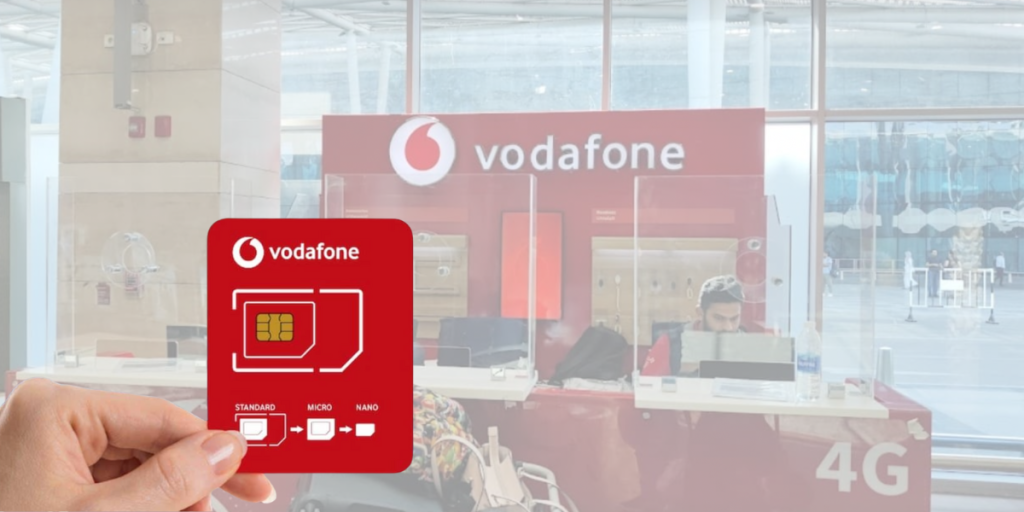
Option 3: Airport SIM kiosk — Physical SIM only
| Location | What they offer | Notes |
| Cairo Airport (Vodafone/Orange kiosks) | Physical SIM ONLY | No eSIM for tourists at kiosks |
| SIM store in arrival hall | Tourist SIM packages | Aggressive upsell + verification required |
Typical issues:
- Kiosk staff pushes you into bigger plans
- Passport must be scanned
- Setup can take 20–30 minutes
Works… but not convenient after a long flight.
TL;DR
Egypt supports eSIM — but airport kiosks do not, and local carriers make eSIM activation complicated.
Travel eSIM = easiest + fastest + no passport needed.
III. Do Vodafone, Orange, and Etisalat Support eSIM in Egypt? (Reality Check for Tourists)
Yes, Egypt’s local carriers technically support eSIM, but activation is mostly geared toward local subscribers, not tourists.
Here’s how it plays out in real life:
| Local Carrier | Supports eSIM? | For Tourists? | What Actually Happens |
| Vodafone Egypt | ✅ Yes | ⚠️ Limited | eSIM activation typically available only for postpaid / contract customers, not prepaid tourist SIMs. Many stores require Egyptian ID. |
| Orange Egypt | ✅ Yes | ⚠️ Sometimes | Some city stores may activate eSIM with a passport, but airport kiosks do not offer eSIM. Physical SIM is default. |
| Etisalat (Etisalat by e&) | ✅ Yes | ⚠️ Very limited | Can activate eSIM for certain plans, but many branches refuse if you aren’t a local resident. |
Why tourists often get rejected:
- Tourist SIMs at Cairo Airport only come as physical SIMs
- eSIM activation requires passport registration, sometimes even an Egyptian ID number
- Staff at kiosks are incentivized to sell higher-priced physical SIM bundles
Real traveler feedback:
“Vodafone store confirmed eSIM exists, but ‘not for the tourist plan’. Told me to buy physical SIM instead.”
“Orange would only activate eSIM if I signed a contract. No thanks.”
Summary:
Egypt carriers support eSIM,
but they don’t make it easy for tourists to get one.
✅ Easier alternative: Travel eSIM (GoHub / Airalo / Holafly)
- No passport
- No ID registration
- No line
- Works immediately upon landing
Scan → Activate → Connect.
IV. Best eSIM Option for Travelers — Fast, No Passport, No Airport Hassle
Because local carriers make eSIM activation complicated — and airport kiosks only offer physical SIM cards — most travelers now switch to travel eSIMs, which activate instantly via QR code.

Here’s how the three most popular Egypt travel eSIM providers compare:
Travel eSIM Comparison (Egypt)
| Provider | Plan Type | Example Plan | Cost per GB | Hotspot | Best For |
| GoHub | Fixed data (high GB) | 15GB / ~US$30 | ✅ ~$2/GB (best value) | ✅ Allowed | 💰 Best cost-per-GB |
| Airalo | Fixed data | 10GB / ~$32–$35 | ~$3.20/GB | ✅ Allowed | 🧳 Predictable usage |
| Holafly | “Unlimited” (FUP applies) | Unlimited / 7–30 days | Not shown (no data disclosure) | ⚠️ Hotspot may be restricted | 🚀 Heavy streaming |
GoHub is the best pick for most travelers — you get more data for less money, no ID, no queue.
Why travel eSIM is better for Egypt
Travel eSIM advantages:
- Install eSIM before your flight
- Internet is working when the plane lands
- No passport registration required
- No waiting at kiosks after an overnight flight
- Dual SIM ready (keep your home SIM active for OTPs/banking codes)
In Egypt, time saved = patience saved.
Real world scenario
When you land at Cairo Airport:
- With travel eSIM → turn on data roaming → already online
- With local SIM → queue at a kiosk → show passport → upselling pressure → physical SIM swap
TL;DR:
Egypt supports eSIM, but travel eSIM is the only option that works smoothly for tourists.
V. Best eSIM Option for Travelers — Fast, No Passport, No Airport Hassle
Because local carriers make eSIM activation complicated — and airport kiosks only offer physical SIM cards — most travelers now switch to travel eSIMs, which activate instantly via QR code
Here’s how the three most popular Egypt travel eSIM providers compare:
Travel eSIM Comparison (Egypt)
| Provider | Plan Type | Example Plan | Cost per GB | Hotspot | Best For |
| GoHub | Fixed data (high GB) | 15GB / ~US$30 | ✅ ~$2/GB (best value) | ✅ Allowed | 💰 Best cost-per-GB |
| Airalo | Fixed data | 10GB / ~$32–$35 | ~$3.20/GB | ✅ Allowed | 🧳 Predictable usage |
| Holafly | “Unlimited” (FUP applies) | Unlimited / 7–30 days | Not shown (no data disclosure) | ⚠️ Hotspot may be restricted | 🚀 Heavy streaming |
GoHub is the best pick for most travelers — you get more data for less money, no ID, no queue.
Why travel eSIM is better for Egypt
Travel eSIM advantages:
- Install eSIM before your flight
- Internet is working when the plane lands
- No passport registration required
- No waiting at kiosks after an overnight flight
- Dual SIM ready (keep your home SIM active for OTPs/banking codes)
In Egypt, time saved = patience saved.
Real world scenario
When you land at Cairo Airport:
- With travel eSIM → turn on data roaming → already online
- With local SIM → queue at a kiosk → show passport → upselling pressure → physical SIM swap
TL;DR:
Egypt supports eSIM, but travel eSIM is the only option that works smoothly for tourists
VI. How to Check If Your Phone Supports eSIM
Before buying any eSIM for Egypt, you need to confirm two things:
- Your phone supports eSIM
- Your phone is unlocked (not tied to a carrier contract)
Checking this takes less than 15 seconds.
iPhone: How to verify eSIM support
iPhones that support eSIM:
iPhone XR / XS / 11 / 12 / 13 / 14 / 15 and all newer models.
How to check:
- Go to: Settings → General → About
- Scroll down → look for EID (eSIM ID)
If you see EID, your iPhone supports eSIM.
Important:
US models of iPhone 14 & 15 are eSIM-only → physical SIM cannot be inserted.
Perfect for Egypt travel.
Samsung (Android): How to verify eSIM support
eSIM supported on most flagship models:
- Galaxy S20 / S21 / S22 / S23 / S24
- Galaxy Z Flip / Fold series
How to check:
- Go to: Settings → Connections → SIM Manager
- Look for: Add eSIM
If “Add eSIM” appears → device supports eSIM.
⚠️ Note: Some Samsung models sold in certain regions (Middle East / carrier locked) may disable eSIM.
Google Pixel: How to verify eSIM support
Most Pixel devices from Pixel 3 onward support eSIM.
How to check:
- Go to: Settings → Network & Internet
- Tap: Add eSIM
If option exists → eSIM supported.
MUST-KNOW: Your phone must be unlocked
Regardless of brand:
- If you bought your phone from a carrier and it’s still under contract → eSIM may not activate
- If you bought it from Apple / official store → you’re safe
Check unlock status (iPhone):
Settings → General → About → Carrier Lock
→ Should say: No SIM restrictions
Quick Test
If your phone shows EID (iPhone) or Add eSIM (Samsung/Pixel) — you’re good.
➡️ Pros & Cons of Using eSIM in Egypt (simple, tourist-friendly bullets)
VII. Pros & Cons of Using eSIM in Egypt
Travelers love eSIM because it removes friction — no kiosk, no waiting, no SIM swap.
But like anything, it has trade-offs.

Pros of using eSIM in Egypt
| Benefit | Why it matters to travelers |
| Instant activation | Internet works as soon as the plane lands. |
| No passport or registration | Avoid kiosk paperwork and identity verification. |
| Keep your physical SIM inserted | Still receive banking OTPs or calls on your home number. |
| No risk of losing SIM card | Especially useful if you switch phones or use dual SIM. |
| Install before departure | Zero stress after an overnight flight into Cairo. |
| Hotspot/tethering works (GoHub / Airalo) | Great for laptop work or sharing data. |
With eSIM, airport arrival is walk out → call Uber → go.
Cons of using eSIM in Egypt
| Limitation | What to expect |
| Requires an eSIM-compatible device | Older or budget Android models may not support eSIM. |
| Must be unlocked | Carrier-locked devices may block installation. |
| Holafly “unlimited” has FUP | Speed may throttle after high usage. |
| Need Wi-Fi for installation | Cairo Airport has Wi-Fi; or activate before flight. |
If you’re using an older phone or a carrier-locked device, a physical SIM at the airport might be your only option.
TL;DR:
If your phone supports eSIM, using eSIM in Egypt is faster, simpler, and cheaper than buying a SIM card at the airport.
VIII. How to Activate an Egypt eSIM (Step-by-Step)
Activating an eSIM in Egypt is quick and painless — no passport, no queue, no kiosk upsell.
🔧 Activation steps
- Buy an eSIM online
(GoHub / Airalo / Holafly — GoHub offers best cost-per-GB) - Open your email or app and scan the QR code
- Go to phone settings
- iPhone: Settings → Cellular → Add eSIM
- Samsung/Pixel: Settings → Network & Internet → Add eSIM
- Turn on Data Roaming for the eSIM
- ✅ You’re connected the moment the plane touches down in Cairo
Helpful tips
- Install before your flight → no need for airport Wi-Fi.
- Leave your physical SIM active for OTP/banking SMS.
- For dual SIM users: choose “Primary SIM for calls” and eSIM for data.
Scan → connect → ride-share → hotel.
No hassle.
✅ Ready to Travel Egypt Stress-Free?
Skip the airport queues, passport scans, and SIM swaps.
Install your Egypt eSIM in 30 seconds — and land with internet ready.
👉 Get your Egypt eSIM from GoHub now →
✔️ Best value per GB
✔️ No passport needed
✔️ Works instantly on arrival
Travel smarter. Stay connected. GoHub.
IX. FAQs About eSIM in Egypt
1. Does Egypt support eSIM?
Yes. Egypt supports eSIM on major carriers (Vodafone, Orange, Etisalat) and through travel eSIM providers (GoHub, Airalo, Holafly).
However, kiosk staff at the airport usually do not activate eSIM for tourists — they sell physical SIM cards instead.
2. Can tourists get an eSIM at Cairo Airport?
Not reliably. Airport kiosks mainly offer physical SIM cards, even though carriers technically support eSIM.
If you want guaranteed eSIM activation, buy a travel eSIM before arrival.
3. Does Vodafone Egypt support eSIM on prepaid plans?
Vodafone supports eSIM, but mostly for postpaid contracts.
Prepaid tourist SIMs are almost always physical SIM cards.
4. Which Egypt eSIM is easiest for travelers?
Travel eSIMs (GoHub, Airalo, Holafly) are easiest.
You buy online → scan QR → internet works instantly when the plane lands.
5. Does eSIM work on iPhone in Egypt?
Yes. All iPhones from XR, XS, 11, 12, 13, 14, 15 and newer support eSIM in Egypt.
iPhone 14/15 (USA models) are eSIM-only, so they cannot use physical SIM cards.
6. Can I keep my physical SIM active while using an eSIM?
Yes. That’s one of the benefits — you can keep your home SIM inserted for SMS/OTP and use the eSIM for mobile data.
7. Can I use hotspot/tethering with eSIM in Egypt?
- GoHub → ✅ hotspot allowed
- Airalo → ✅ hotspot allowed
- Holafly → ⚠️ hotspot may be restricted depending on plan