Best eSIM for Egypt for iPhone Users (Compatibility & Setup Guide)
Introduction
If you are traveling to Egypt and you use an iPhone, choosing the right eSIM can make the difference between being connected the moment you land or spending your first hour at the airport struggling with network issues.
On paper, buying an eSIM looks simple:
select a plan → scan a QR code → activate data.
In reality, Egypt has a few details that catch iPhone users off guard:
- Not every eSIM provider supports all iPhone models.
- Some eSIM plans connect only to one network in Egypt, and its performance varies by region.
- Many eSIMs are data-only and do not support local calls or SMS.
- Airport Wi-Fi often requires OTP verification, which you cannot receive until your eSIM is active.
iPhone users have an advantage: iOS handles eSIM installation smoothly and supports multiple eSIM profiles, making it ideal for travelers. But to avoid activation issues, slow speeds, or wasted money, you need to choose an eSIM that is compatible with iPhone and works on strong local networks like Orange Egypt or Vodafone Egypt.
In this guide, we will cover:
- which iPhone models support eSIM in Egypt,
- how to install an eSIM correctly (before your flight, not at the airport),
- which eSIM providers work best for Egypt’s networks,
- how to fix common iPhone data issues like “No Service” or “No Internet.”
This is a practical, compatibility-first guide for anyone searching for “esim egypt iphone”—written specifically for iPhone travelers.
Next, we begin with a clear compatibility checklist so you know exactly what to verify before purchasing an eSIM.
Phone Compatibility Checklist (Egypt-specific)
Before buying any eSIM for Egypt, verify these requirements.
Skipping even one of them can lead to activation delays or “No Service” when you land in Cairo, Giza, Luxor, or Hurghada.
1. Your iPhone must be unlocked
If your phone is carrier-locked, it will not register on Egyptian networks.
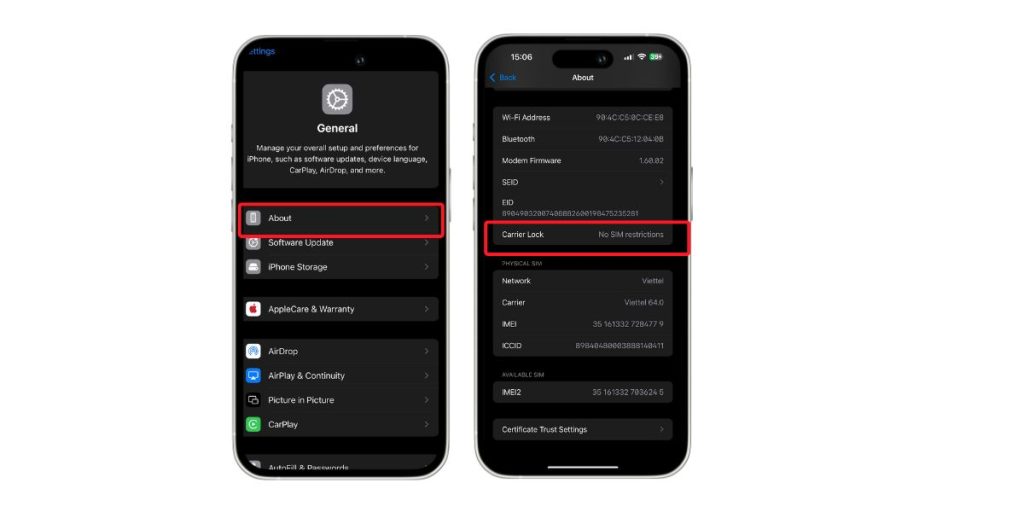
How to check:
- Go to: Settings → General → About
- Find the line: Carrier Lock
- It must show: No SIM restrictions
If it shows anything else, contact your carrier before you travel.
2. Your iPhone must support eSIM
Only the following models support eSIM in Egypt:
- iPhone XS, XR
- iPhone 11 / 12 / 13 / 14 / 15
- iPhone SE (2nd generation or newer)
- All newer models (including iPhone 16 and beyond)
Important detail:
iPhone 14 and newer models sold in the United States are eSIM-only (no physical SIM slot).
Using an eSIM is not optional on those models.
3. Install the eSIM at home, not at the airport
The first installation requires Wi-Fi.
Airport Wi-Fi in Egypt often asks for OTP verification, which you cannot receive without a working line.
Correct routine:
- Buy eSIM online.
- Install profile at home using Wi-Fi.
- Activate the eSIM only after landing.
4. Turn on Data Roaming
This is the most common reason eSIM appears to “not work.”
- Go to Settings → Cellular / Mobile Data → Your eSIM line
- Turn on Data Roaming
This does not trigger extra roaming charges because data usage is billed through the eSIM plan you purchased.
5. Save APN settings in advance
Some networks in Egypt require manual APN entry.
Common APN values:
- Orange Egypt: internet or web.orange.eg
- Vodafone Egypt: internet.vodafone.com.eg
- Etisalat (e& Egypt): etisalat
Where to enter APN:
- iPhone: Settings → Cellular → eSIM → Cellular Data Network
6. Be prepared to switch networks manually
In Egypt, network strength varies by region:
- Cairo and Giza: generally stable
- Hurghada and Sharm el-Sheikh: may require manual switch
Manual switch:
Settings → Cellular → Network Selection → turn off Automatic → pick the best network
Start with Orange. If performance is weak, switch to Vodafone.
If you want an eSIM that supports iPhones, can be installed at home, and connects to strong networks when you land, check:
Egypt eSIM for travelers — https://gohub.com/esim/egypt
Which iPhone Models Support eSIM in Egypt
Not every iPhone can use an eSIM, and not every eSIM works well on every iPhone in Egypt.
To avoid activation problems, check the list below.
Supported iPhone Models (eSIM-ready for Egypt)
eSIM is supported on:
- iPhone XS / XS Max
- iPhone XR
- iPhone 11 series
- iPhone 12 series
- iPhone 13 series
- iPhone 14 series
- iPhone 15 series
- iPhone SE (2nd generation and newer)
- Newer models (including iPhone 16 and beyond when applicable)
These models allow you to activate an eSIM instantly once your phone detects the Egyptian network.
Important note about U.S. models (iPhone 14, 15 and newer)
If your iPhone 14 or 15 is a U.S. version, it has no physical SIM tray.
You are required to use an eSIM for all mobile connectivity.
That means:
- You cannot fall back to a physical SIM
- You must install an eSIM before landing
For travelers using these models, eSIM is not optional.
Dual SIM capability (iPhone advantage)
Most iPhones from XS onward allow:
- 1 physical SIM + 1 eSIM, or
- 2 active eSIMs at the same time (depending on the model)
This is useful when traveling to Egypt because:
- you can keep your home SIM active for OTP or banking SMS,
- while the eSIM provides mobile data on local networks.
Example:
- Primary SIM: keep your original number for SMS/OTP
- eSIM: use Egyptian data for internet and navigation
Models that do NOT support eSIM
- iPhone 8, 8 Plus, 7, 6, 5, and older
- iPhone SE (1st gen)
These devices require a physical SIM card.
If you use one of these models, you will have to buy a SIM at the airport upon arrival.
Summary
If your iPhone is from XS onward, unlocked, and supports eSIM, you can install your eSIM before flying and activate it when you land.
This is the fastest way to get online in Cairo without queuing at SIM kiosks.
If you prefer an option that works smoothly on all compatible iPhones:
Egypt eSIM for travelers — https://gohub.com/esim/egypt
How to Install an eSIM on iPhone (Step-by-step)
Installing an eSIM on an iPhone is quick, and the entire process can be completed in a few taps.
What matters most is: install at home using Wi-Fi, activate only when you land in Egypt.
Below are the two official installation methods that work on all eSIM-compatible iPhones.
Method 1: Install using QR Code (most common)
- Open Settings
- Tap Cellular / Mobile Data
- Tap Add eSIM or Add Cellular Plan
- Scan the QR code provided by your eSIM provider
- When prompted, choose Add Cellular Plan
After installation:
- Leave the eSIM turned off until you arrive in Egypt.
- Activation happens only when you enable the line.
Method 2: Add eSIM directly from App (no QR needed)
Many eSIM providers support installation via app:
- Download the provider’s app
- Create your account and buy your Egypt plan
- Select Install eSIM / Add eSIM
- Follow the automatic setup instructions on screen
This method is helpful if you cannot scan a QR code or are buying the plan on your phone.
Dual SIM setup on iPhone (eSIM + physical SIM)
iPhone allows two active SIMs at once:
- Physical SIM: keep your home number active for SMS and banking OTP
- eSIM: use mobile data in Egypt
After installing the eSIM:
- Go to Settings → Cellular / Mobile Data
- Under Cellular Data, select the eSIM as your data line
- Keep your physical SIM for calls/SMS if needed
This is especially useful for airport pickups, booking drivers, or verifying reservations.
When to activate the eSIM
- Install the eSIM before you fly (using home Wi-Fi)
- Activate the eSIM after landing, by simply turning it on
Activation sequence when you land in Cairo:
- Turn off Airplane Mode
- Go to Settings → Cellular → Turn On eSIM Line
- Turn on Data Roaming
Your iPhone will register on Orange, Vodafone, or Etisalat within seconds.
If you want an eSIM that supports iPhone installation, can be added before departure, and activates as soon as your phone connects to the network in Egypt:
Egypt eSIM for travelers — https://gohub.com/esim/egypt
Troubleshooting for iPhone Users in Egypt
Even with a compatible eSIM and a supported iPhone model, some travelers still run into activation or data issues upon arrival. These are the most common iPhone-specific problems in Egypt and how to fix them quickly.
Problem 1: The eSIM is installed, but there’s no internet
This is the most common issue and usually has a simple fix.
Solution: Turn on Data Roaming
Settings → Cellular / Mobile Data → your eSIM line → enable Data Roaming
Your eSIM will not connect to Egyptian networks unless Data Roaming is turned on.
Problem 2: You land in Cairo or Hurghada and see “No Service”
In some areas, automatic network selection doesn’t choose the best signal.
Solution: Manually select a network
Settings → Cellular → Network Selection → turn off Automatic → choose:
- Orange Egypt
- Vodafone Egypt
- Etisalat (e& Egypt)
For many travelers, simply switching to Orange solves the problem.
Problem 3: The eSIM connects but data does not start
In this case, APN might be missing.
Solution: Enter APN manually
Settings → Cellular → your eSIM → Cellular Data Network
Use these APN values:
- Orange Egypt: internet or web.orange.eg
- Vodafone Egypt: internet.vodafone.com.eg
- Etisalat: etisalat
After entering APN, toggle Airplane Mode off/on to refresh.
Problem 4: Slow speeds in resort areas
Hurghada and Sharm el-Sheikh sometimes require switching networks.
Solution: Try Orange → then Vodafone
Network performance varies by area along the Red Sea coastline.
Problem 5: WhatsApp asks if you want to change numbers
Good news: Your WhatsApp account stays linked to your original SIM number.
Data can be from the eSIM, while WhatsApp uses your original number.
You do not lose message history or ongoing chats.
When you prefer the simpler routine — install at home, land, turn on data, and start using — you can choose:
Egypt eSIM for travelers — https://gohub.com/esim/egypt
Conclusion
iPhone and eSIM are the perfect combination for traveling in Egypt — as long as the basics are done right.
Install before departure, keep your primary SIM active for calls/SMS if needed, and let the eSIM handle data once your phone detects the Egyptian network. iPhone’s dual SIM capabilities make it easy to maintain your original number while staying connected with fast data throughout Cairo, Giza, Luxor, and even the coastline.
Taking a few minutes to verify compatibility and choose the right eSIM prevents the common pitfalls that leave travelers offline at the airport.
If you prefer a plan that supports iPhone installation, clear setup instructions, and strong local network access:
Egypt eSIM for travelers — https://gohub.com/esim/egypt