How to Buy an eSIM for Egypt Before Flying (Complete 2025 Guide)
Traveling to Egypt soon?
If staying connected is a priority for maps, ride-hailing, translation apps, and travel safety, getting mobile data before landing is one of the smartest decisions you can make.
Many travelers still wait until they arrive at Cairo International Airport, only to discover:
- Long queues at SIM kiosks
- Higher prices for tourist SIMs
- Limited kiosk hours, especially late at night
- Sales staff pushing physical SIM cards instead of eSIMs
A much easier option exists now: buy an Egypt eSIM online before you fly.
With a travel eSIM, you scan a QR code, install the plan at home, and your phone connects to data the moment you land. No paperwork. No kiosks. No stress.
In this guide, you’ll learn:
- The difference between local eSIM vs travel eSIM
- How to check whether your phone supports eSIM
- Step-by-step instructions to activate it before departure
- A clear comparison: airport SIM vs prepaid eSIM
- Why Gohub is a proven and safe option to buy eSIM Egypt
Let’s make your arrival smoother.
Why You Should Buy an Egypt eSIM Before Your Flight
Here’s what typically happens to travelers arriving at Cairo, Luxor, or Hurghada airport:
- People queue at SIM counters after a long flight.
- They are tired. They just want to get to their hotel.
- The kiosks offer tourist packages at unpredictable prices.
Buying a prepaid eSIM online stops all that.
🛫 For official flight or airport info, check out the Cairo Airport website
Benefits of buying before flying:
| Benefit | Explanation |
| No airport hassle | Skip queues, avoid pushy upsells. |
| Instant data on landing | Your phone connects as soon as the plane lands. |
| Transparent pricing | You see final cost and data limits before purchase. |
| Safer arrival | Access maps and Uber/Bolt before stepping outside. |
| No passport registration | Travel eSIMs usually do not require identity checks. |
Airport SIM pricing often fluctuates based on demand. Online travel eSIMs offer consistent pricing and clear data allocation in GB—not “unlimited but throttled after X GB.”
Local eSIM vs. Travel eSIM for Egypt
Before choosing, understand the difference.
| Feature | Local eSIM (Egyptian carriers) | Travel eSIM (Prepaid eSIM Egypt Online) |
| Requires Egyptian ID/Address | Often yes | No |
| Can include local phone number | Yes | Usually no |
| Designed for short stays | Not always | Yes |
| Activation | In-store, with documents | QR code via email |
| Ideal for | Long stays, residents | Tourists, business travelers |
Most short-term visitors choose travel eSIM because anyone can buy it online and activate it before departure.
Egypt Mobile Network Overview (2025)
Egypt has four major carriers:
| Carrier | Known for |
| Vodafone Egypt | Widest coverage nationwide |
| Orange Egypt | Stable speeds in cities |
| Etisalat / e& | Decent coverage and value |
| WE Telecom | Government-owned network, still growing |
Travel eSIMs often roam on Vodafone or Orange, so you still get strong signal in Cairo, Giza, Luxor, or Hurghada.
Pre-Flight Checklist: Read This Before You Buy
Follow these steps to avoid activation issues later.
1. Check eSIM compatibility
Most recent iPhones, Google Pixel, and newer Samsung models support eSIM.
Quick test:
Settings → Mobile Data → Add eSIM
If you see “Add eSIM” or “Add Mobile Plan,” your phone is compatible.
2. Ensure the phone is unlocked
If your phone is carrier-locked, a travel eSIM may not activate.
3. Install the eSIM profile at home
You don’t need to turn it on yet.
Installation requires Wi-Fi.
4. Keep roaming ON for the eSIM line
Roaming needs to be enabled for the travel eSIM to function.
5. Screenshot your QR code + activation instructions
Airport Wi-Fi can be unstable. Better to save everything offline.
Step-by-Step: How to Buy and Install an Egypt eSIM Online
Buying an eSIM online takes about three minutes.
Step 1: Choose a prepaid eSIM plan
A good plan should show:
- Data allowance (example: 10GB)
- Validity period (example: 10 days)
- Supported network
- Whether hotspot/tethering is allowed
Tip: Avoid “unlimited” eSIM plans unless they disclose how many GB are truly high-speed.
Step 2: Purchase the plan online
You’ll receive a QR code via email immediately.
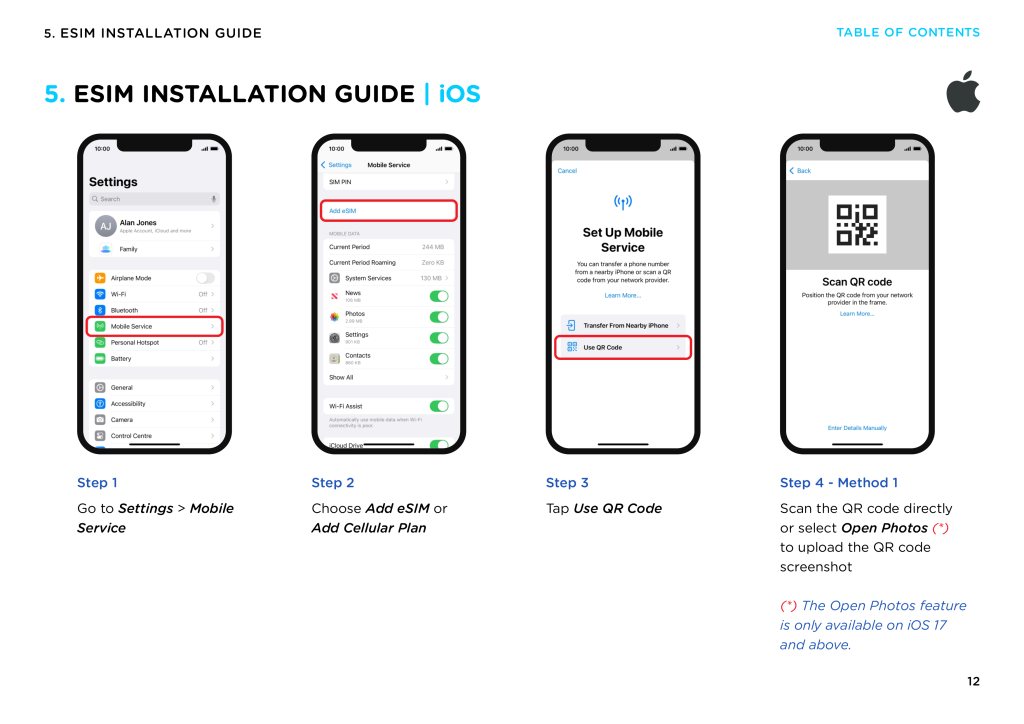
Step 3: Add the eSIM to your phone
On iPhone:
Settings → Mobile Data → Add eSIM → Scan QR Code
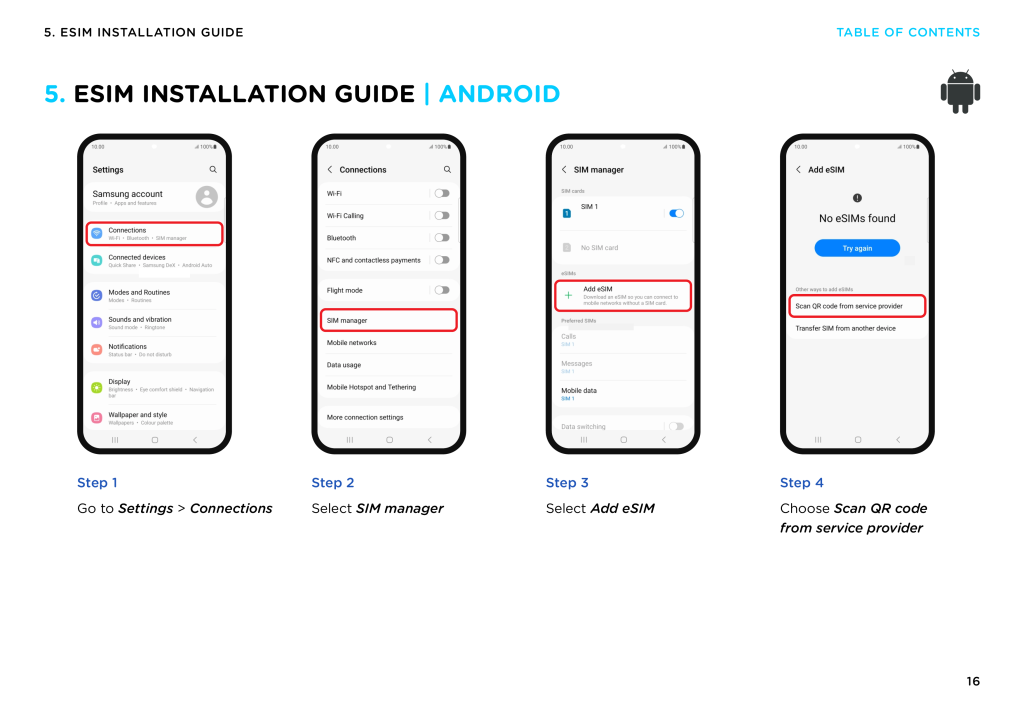
On Samsung:
Settings → Connections → SIM Manager → Add eSIM
Step 4: Turn on data when landing
When your plane lands:
- Open Mobile Data settings
- Select your eSIM line as Data
- Turn on Data Roaming
Within seconds, your phone connects.
Airport SIM vs. Buying Prepaid eSIM Egypt Online
| Criteria | Airport SIM card | Travel eSIM (Buy Egypt eSIM Online) |
| Time required | 15–45 mins queue | Immediate + installed before flying |
| Activation | Paperwork + SIM swap | QR code scan, no paperwork |
| Risk | Kiosks sometimes closed late night | None |
| Transparency | Price varies | Clear pricing |
| Convenience | Must visit counter | Install at home |
| Best for | Long-term stays with local calls | Tourists, digital nomads, business trips |
Buying ahead gives freedom and control.
Best Place to Buy an Egypt eSIM Online (Recommended)
If you want a reliable and safe provider,
Gohub is an excellent pick.
Here’s why travelers like it:
✅ Straightforward prepaid eSIM Egypt plans
✅ QR code delivery in seconds
✅ 24/7 human support
✅ Works the moment you land
✅ No need to remove your physical SIM
🔗 Buy Egypt eSIM online here:
👉 https://gohub.com/esim/egypt
Gohub stands out because its pricing is transparent, data-based, and traveler-focused—no confusing “unlimited but throttled” policies.
For general travel safety advice, visit the U.S. Travel Advisory on Egypt or UK Foreign Travel Advice
Coverage and Real-World Speed in Egypt
Most travel eSIMs roam on Vodafone or Orange networks.
Expect fast data in Cairo, Giza (pyramids area), Luxor, Aswan, and Hurghada.
Speed tips:
- Download Google Maps offline before flying
- Use WhatsApp for calling (works well with eSIM data)
- For Instagram/YouTube, pick a plan with more GB
Troubleshooting: Quick Fixes
| Issue | Fix |
| No data after landing | Turn on Data Roaming |
| Slow speed | Switch network mode to 4G/5G |
| QR code lost | Re-download from email |
| Hotspot not working | Check if the plan supports tethering |
Most issues resolve in 30 seconds.
FAQs About Buying an Egypt eSIM
❓ Can I activate the eSIM before flying?
Yes. Install at home, then activate data when you land.
❓ Will I get an Egyptian phone number?
Travel eSIMs are usually data-only.
Your WhatsApp continues working with your existing number.
❓ Can I hotspot from the Egypt eSIM?
Most prepaid eSIM Egypt plans allow tethering, but check the description.
❓ Is prepaid eSIM cheaper than roaming?
Yes. Carrier roaming can cost $10–15 per day.
A prepaid Egypt eSIM starts around a few dollars per GB.
❓ Can I scan the QR code more than once?
No. eSIM QR codes usually work one time only, so save it carefully.
Final Thoughts
If you want to avoid airport stress and get online the second you land, the smartest move is simple:
➡️ Buy your eSIM for Egypt before your flight.
You get:
- Transparent pricing
- No paperwork or SIM swap
- Instant connectivity on arrival
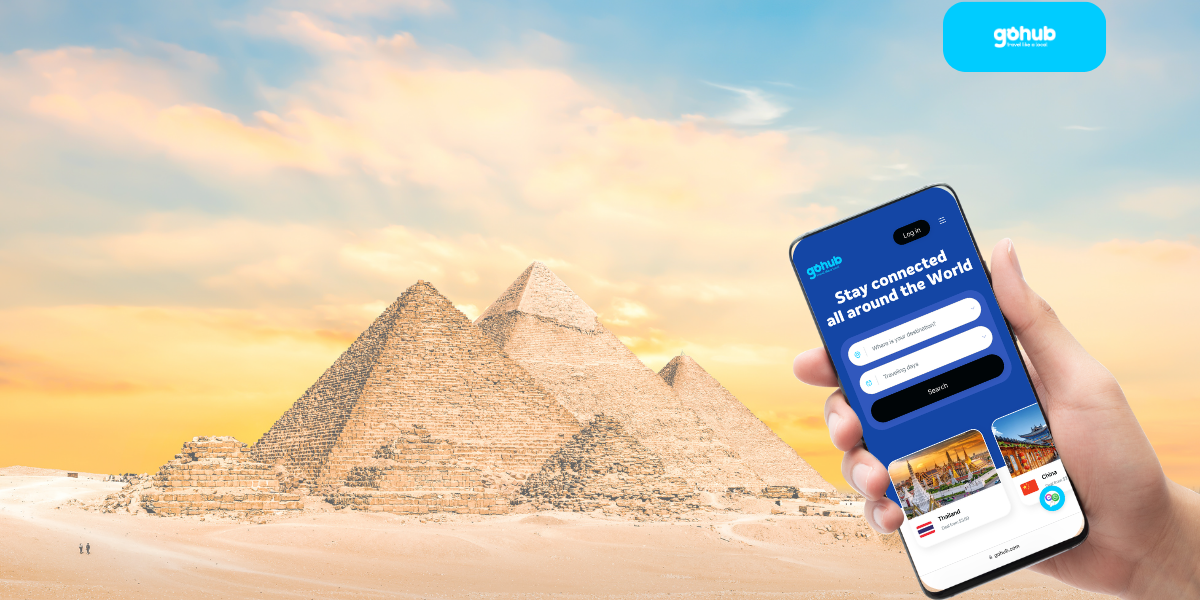
🔗 The easy choice many travelers use:
👉 https://gohub.com/esim/egypt
Travel smarter. Arrive connected.